
In this article
SchoolDay Login is disabled by default. When enabled, it requires MFA for teachers and students. Users sign in with a username and password, then complete MFA using the configured factors:
- AD LDAP (only first factor)
- Face ID (only second factor)
- ID Card (QR Code/Badge)
Note: Configure at least one authentication factor before enabling this setting. Turning on the toggle without configuring factors may prevent users from signing in.
Prerequisites
- Primary District Admin permissions.
- Ensure at least one supported IdP, like Google Workspace, is configured as a login method.
- Configure AD LDAP separately if you intend to use it as a first factor.
Enable SchoolDay Login
- In Connect, navigate to Administration > Login Methods > SchoolDay Login.
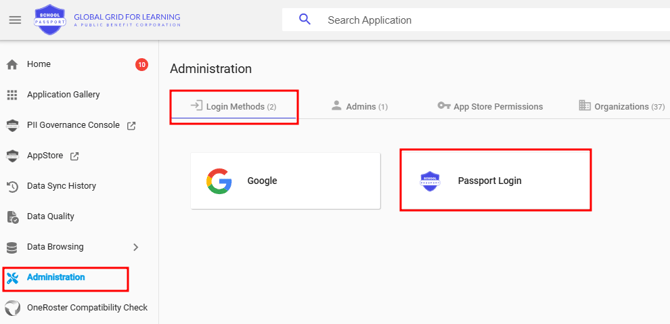
- Turn on the Activate SchoolDay Login toggle.
- Configure the required MFA factors for teachers and students. For more information, see Configure MFA methods for users.
- Click Save.
The feature is now active. Teachers and students will be prompted to complete MFA at sign-in using the configured factors.
Verify the configuration
- Navigate to Connect > Administration > Login Methods > SchoolDay Login.
- Verify that the Activate SchoolDay Login toggle is set to On.
- Confirm that a First Factor and Second Factor are configured for the required user groups.
Troubleshooting
|
Symptom |
Cause |
Resolution |
|---|---|---|
|
Users cannot sign in |
No authentication factors configured |
Set the First Factor and Second Factor under Teacher or Student Authentication, then click Save. |
|
Activate SchoolDay Login toggle is not visible |
Insufficient permissions |
Confirm you are signed in with Primary District Admin privileges. |
|
Factor options missing |
IdP not configured |
Add a login method under Connect > Administration > Login Methods. |
Related resources
- What is SchoolDay Login
- Configure MFA methods for users
- Set up Face ID (MFA)
- Set up Google as MFA in SchoolDay Login