
Plugin-only import mode lets SchoolDay sync roster data from PowerSchool using Plugin v4 exclusively, without calling V1 API endpoints. This is the recommended configuration for districts running PowerSchool 25.2.0.0 or later.
Requirements
- You must be running PowerSchool 25.2.0.0 or later.
- You must have Plugin v4 installed and enabled in PowerSchool. See Manage the PowerSchool Plugin.
- You must have District Admin access in SchoolDay.
- You must have System Administrator access in PowerSchool.
Configure plugin-only import mode
Plugin-only import mode requires two changes: one in SchoolDay and one in PowerSchool. Both must be set for the mode to take effect.
Step 1: Enable plugin-only import in SchoolDay
- Go to the PowerSchool app in SchoolDay.
- Click Settings.
- In Delivery Config, click Advanced Settings.
- Select PowerSchool plugin-only import.
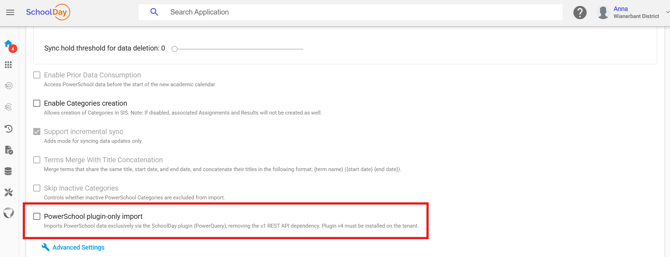
- Click Save.
Step 2: Set API access to No Access in PowerSchool
When Plugin v4 is installed, PowerSchool sets the V1 API access level to No Access by default. Verify this is the case:
- Log in to PowerSchool as a System Administrator.
- On the left menu, click System.
- Scroll down and click System Settings.
- Click Plugin Management Dashboard.
- Find the SchoolDay Data Sync plugin and click it.
- Click Data Provider Configuration.
- For Access Level for V1 APIs, confirm No Access is selected. If it is not, select No Access.
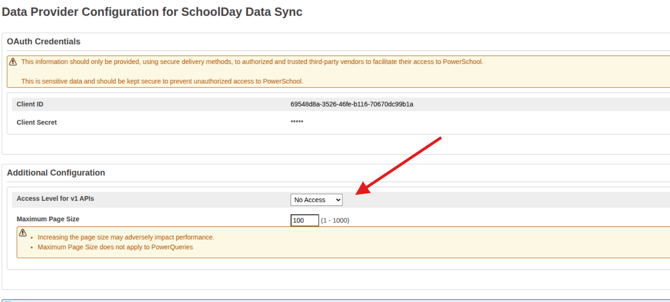
- Click Save.
After both steps are complete, the next sync will run without V1 endpoints.
Verify the configuration
Run a manual sync and confirm it completes without errors:
- Go to the PowerSchool app in SchoolDay.
- Click Run Sync.
- Once the sync finishes, go to History and confirm the sync status is Success.
If the sync completes successfully, plugin-only import mode is active.
Revert to V1 API mode
To return to syncing with V1 endpoints, reverse both settings:
- In SchoolDay, go to PowerSchool > Settings > Delivery Config > Advanced Settings and deselect PowerSchool plugin-only import. Click Save.
- In PowerSchool, navigate to System > System Settings > Plugin Management Dashboard > SchoolDay Data Sync > Data Provider Configuration and change Access Level for V1 APIs to Read Access. Click Save.