---
title: Manage the PowerSchool Plugin
description: Discover how to install and update the PowerSchool plugin and obtain API credentials.
---
[Skip to content](https://help.schoolday.com/knowledge/manage-the-powerschool-plugin#main-content)
English
Show submenu for translations
[More support](https://help.schoolday.com/knowledge/kb-tickets/new?hsLang=en) [Customer portal](https://help.schoolday.com/support?hsLang=en)

- [Go to Knowledge Base](https://help.schoolday.com/knowledge)
Open main navigation
Close main navigation
- [Go to Knowledge Base](https://help.schoolday.com/knowledge)
- English
Show submenu for translations
- [More support](https://help.schoolday.com/knowledge/kb-tickets/new)
- [Customer portal](https://help.schoolday.com/support)
What are you looking for?
- There are no suggestions because the search field is empty.
1. [SchoolDay Help Center](https://help.schoolday.com/knowledge?hsLang=en)
2. [Roster Integrations](https://help.schoolday.com/knowledge/roster-integrations?hsLang=en)
3. [PowerSchool Integration](https://help.schoolday.com/knowledge/roster-integrations?hsLang=en#powerschool-integration)
July 6, 2026
# Manage the PowerSchool Plugin
## Discover how to install and update the PowerSchool plugin and obtain API credentials.
**In this article**
> [Install the plugin](https://help.schoolday.com/knowledge/manage-the-powerschool-plugin#Install-PowerSchool-plugin)
>
> [Configure V1 API access (PowerSchool 25.2.0.0 and newer only)](https://help.schoolday.com/knowledge/manage-the-powerschool-plugin#configure-v1-api-access)
>
> [Update the plugin](https://help.schoolday.com/knowledge/manage-the-powerschool-plugin#Update-PowerSchool-plugin)
>
> [Next steps](https://help.schoolday.com/knowledge/manage-the-powerschool-plugin#Next-steps)
This guide provides you with the knowledge and steps needed to seamlessly integrate PowerSchool into your SchoolDay.
### Before you begin
- You must have System Administrator access in PowerSchool.
- Contact [support@schoolday.com](mailto:support@schoolday.com) if you have not received a plugin file.
### Install the plugin
1. Log in as a System Administrator in your PowerSchool instance.
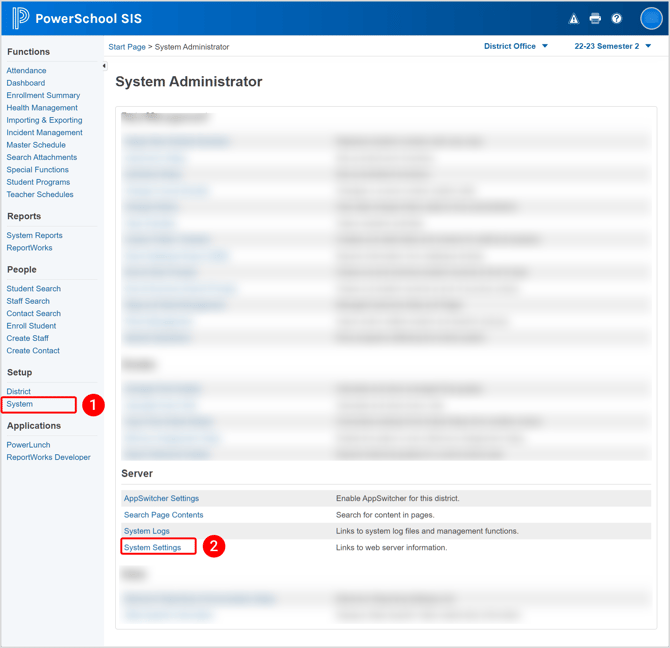
2. On the left menu, select **System** \> **System Settings**.
3. Select **Plugin Management Configuration.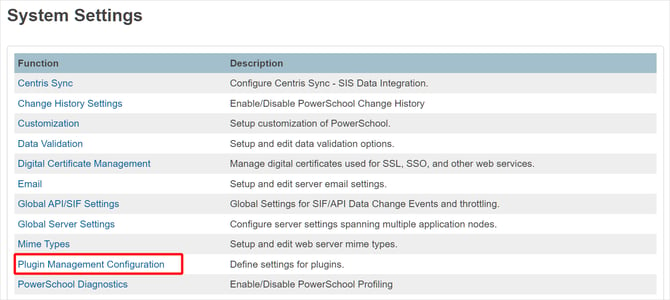**
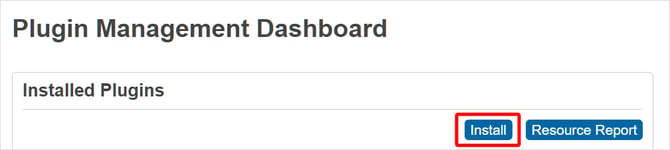
4. On the **Plugin Management Dashboard** page, click **Install.
**
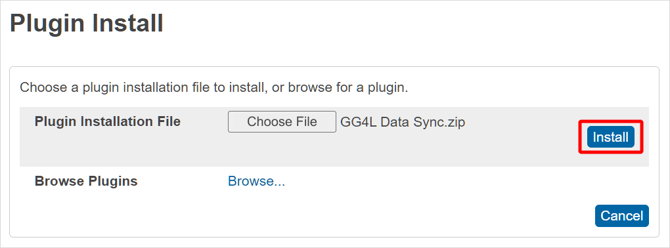
5. On the **Plugin Install** page, select the PowerSchool plugin zip file (you can download the default PowerSchool plugin via [URL](https://dejb1k265ab05.cloudfront.net/plugins/ps_plugin_v3.zip)) and then click **Install**.
**Note:** If you have not received a plugin file, please contact support@gg4l.com.
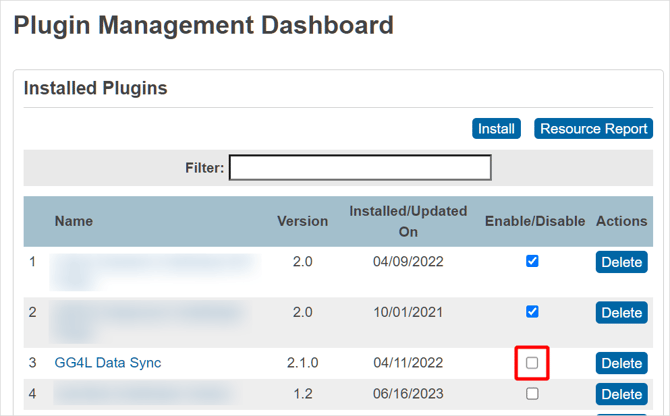
6. By default, the newly installed plugin is not enabled. Once the plugin is enabled, plugin functionality appears throughout PowerSchool. To enable the plugin, navigate to the **Plugin Configuration** page, and select the **GG4L Data Sync** checkbox.
7. To confirm activation, in the **Enable Plugin** sidebar that appeared, click **Enable**.
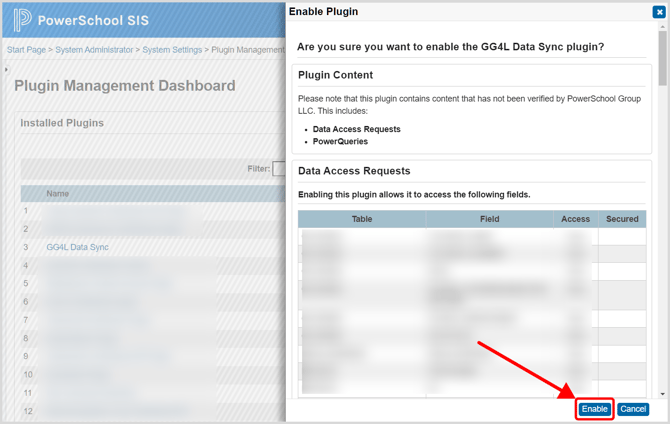
Plugin enabling is completed successfully and is now ready for use.
### Configure V1 API access (PowerSchool 25.2.0.0 and newer only)
**Note**: If you are using the plugin-only import mode, skip this section. See [Enable plugin-only import for PowerSchool](https://help.schoolday.com/knowledge/powerschool-plugin-only-import?hsLang=en)
PowerSchool 25.2.0.0 and newer versions require additional configuration to enable V1 REST API access.
#### Add the V1 API access setting
Add `` to your plugin configuration file. This setting enables access to V1 REST API endpoints, including:
- `/v1/student`
- `/v1/staff`
- `/v1/section`
- `/v1/course`
- `/v1/district`
- `/v1/school`
#### Understand data access permissions
The `FULL` access setting enables the API endpoints but does not grant unrestricted data access. The plugin can only access data fields explicitly defined in the `` section of your plugin configuration file.
Example: If `` lists specific fields from the `students` and `staff` tables, the plugin can only retrieve those fields. All other fields are not returned.
#### Change the access level (optional)
District administrators can modify the API access level in PowerSchool.
1. Go to **System Management** \> **Server** \> **Server Setup** \> **Plugin Configuration**.
2. Select the **GG4L Data Sync** plugin.
3. Go to **Data Provider Configuration**.
4. Choose the access level.
The `` configuration still controls which data fields are accessible regardless of the access level you select.
### Update the plugin
Upon successful installation and configuration of a plugin, you can update it to a new version without the need to delete and reinstall the existing plugin.
1. On the left menu, select **System** \> **System Settings**.

2. Select **Plugin Management Configuration.**
3. Select the **GG4L Data Sync** plugin.
4. Click **Update**.
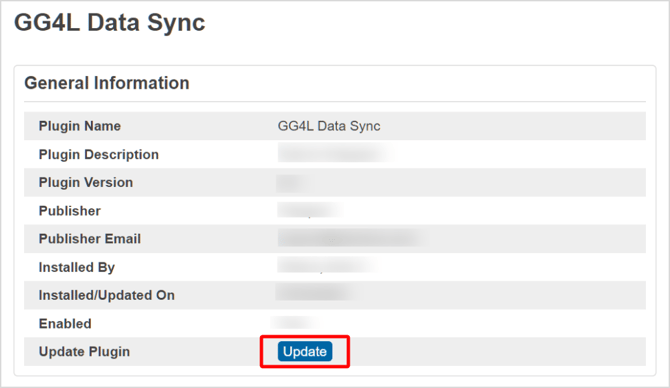
5. Select the PowerSchool plugin zip file (you can download the default PowerSchool plugin using the provided URL) and then click **Submit**.
6. Click **Enable**.
### Next steps
[Get PowerSchool OAuth Credentials](https://help.gg4l.com/knowledge/powerschool-get-oauth-credentials?hsLang=en)
- [Getting Started](https://help.schoolday.com/knowledge/getting-started?hsLang=en#main-content)
- [Introduction](https://help.schoolday.com/knowledge/getting-started?hsLang=en#introduction)
- [Getting Started by Role](https://help.schoolday.com/knowledge/getting-started?hsLang=en#getting-started-by-role)
- [Get Support](https://help.schoolday.com/knowledge/getting-started?hsLang=en#get-support)
- [Legal](https://help.schoolday.com/knowledge/getting-started?hsLang=en#legal)
- [Data Management (Connect)](https://help.schoolday.com/knowledge/data-management-connect?hsLang=en#main-content)
- [Introduction](https://help.schoolday.com/knowledge/data-management-connect?hsLang=en#introduction)
- [Applications](https://help.schoolday.com/knowledge/data-management-connect?hsLang=en#applications)
- [Data Mapping](https://help.schoolday.com/knowledge/data-management-connect?hsLang=en#data-mapping)
- [Data Synchronization](https://help.schoolday.com/knowledge/data-management-connect?hsLang=en#data-synchronization)
- [Data-Sharing Requests](https://help.schoolday.com/knowledge/data-management-connect?hsLang=en#data-sharing-requests)
- [Data Quality](https://help.schoolday.com/knowledge/data-management-connect?hsLang=en#data-quality)
- [Data Privacy (Privacy Shield)](https://help.schoolday.com/knowledge/data-management-connect?hsLang=en#data-privacy-privacy-shield)
- [Grade Sync Service](https://help.schoolday.com/knowledge/data-management-connect?hsLang=en#grade-sync-service)
- [Miscellaneous](https://help.schoolday.com/knowledge/data-management-connect?hsLang=en#miscellaneous)
- [Governance](https://help.schoolday.com/knowledge/data-management-connect?hsLang=en#governance)
- [Roster Integrations](https://help.schoolday.com/knowledge/roster-integrations?hsLang=en#main-content)
- [Introduction](https://help.schoolday.com/knowledge/roster-integrations?hsLang=en#introduction)
- [SFTP Integration](https://help.schoolday.com/knowledge/roster-integrations?hsLang=en#sftp-integration)
- [API Integration](https://help.schoolday.com/knowledge/roster-integrations?hsLang=en#api-integration)
- [Import Integrations](https://help.schoolday.com/knowledge/roster-integrations?hsLang=en#import-integrations)
- [PowerSchool Integration](https://help.schoolday.com/knowledge/roster-integrations?hsLang=en#powerschool-integration)
- [Export Integrations](https://help.schoolday.com/knowledge/roster-integrations?hsLang=en#export-integrations)
- [Administration & Account Settings](https://help.schoolday.com/knowledge/administration-account-settings?hsLang=en#main-content)
- [Account Settings](https://help.schoolday.com/knowledge/administration-account-settings?hsLang=en#account-settings)
- [Organization Management](https://help.schoolday.com/knowledge/administration-account-settings?hsLang=en#organization-management)
- [SSO](https://help.schoolday.com/knowledge/sso?hsLang=en#main-content)
- [Introduction](https://help.schoolday.com/knowledge/sso?hsLang=en#introduction)
- [Identity provider (IdP) Setup](https://help.schoolday.com/knowledge/sso?hsLang=en#identity-provider-idp-setup)
- [SSO Applications](https://help.schoolday.com/knowledge/sso?hsLang=en#sso-applications)
- [SSO Resources](https://help.schoolday.com/knowledge/sso?hsLang=en#sso-resources)
- [MFA for Administrators](https://help.schoolday.com/knowledge/sso?hsLang=en#mfa-for-administrators)
- [MFA for Users (SchoolDay Login)](https://help.schoolday.com/knowledge/sso?hsLang=en#mfa-for-users-schoolday-login)
- [ID Card Login](https://help.schoolday.com/knowledge/sso?hsLang=en#id-card-login)
- [SSO Troubleshooting](https://help.schoolday.com/knowledge/sso?hsLang=en#sso-troubleshooting)
- [LMS Integrations](https://help.schoolday.com/knowledge/lms-integrations?hsLang=en#main-content)
- [Coursera Integration Video Guides](https://help.schoolday.com/knowledge/lms-integrations?hsLang=en#coursera-integration-video-guides)
- [Coursera Platform Integration](https://help.schoolday.com/knowledge/lms-integrations?hsLang=en#coursera-platform-integration)
- [Qwiklabs Platform Integration](https://help.schoolday.com/knowledge/lms-integrations?hsLang=en#qwiklabs-platform-integration)
- [LMS Integrations instructions](https://help.schoolday.com/knowledge/lms-integrations?hsLang=en#lms-integrations-instructions)
- [Resource Management (App Store)](https://help.schoolday.com/knowledge/resource-management-app-store?hsLang=en#main-content)
- [Users & Classes](https://help.schoolday.com/knowledge/resource-management-app-store?hsLang=en#users-classes)
- [Resources](https://help.schoolday.com/knowledge/resource-management-app-store?hsLang=en#resources)
- [Access & Security](https://help.schoolday.com/knowledge/resource-management-app-store?hsLang=en#access-security)
- [Privacy Governance Console (PGC)](https://help.schoolday.com/knowledge/privacy-governance-console-pgc?hsLang=en#main-content)
- [Get Started](https://help.schoolday.com/knowledge/privacy-governance-console-pgc?hsLang=en#get-started)
- [Monitor and Report](https://help.schoolday.com/knowledge/privacy-governance-console-pgc?hsLang=en#monitor-and-report)
- [Govern Apps](https://help.schoolday.com/knowledge/privacy-governance-console-pgc?hsLang=en#govern-apps)
- [For Parents/Students](https://help.schoolday.com/knowledge/for-parents-students?hsLang=en)
- [For Vendors](https://help.schoolday.com/knowledge/for-vendors?hsLang=en)
- [Updates](https://help.schoolday.com/knowledge/updates?hsLang=en#main-content)
- [2026](https://help.schoolday.com/knowledge/updates?hsLang=en#2026)
- [2025](https://help.schoolday.com/knowledge/updates?hsLang=en#2025)
- [2024](https://help.schoolday.com/knowledge/updates?hsLang=en#2024)
- [2023](https://help.schoolday.com/knowledge/updates?hsLang=en#2023)
- [2022](https://help.schoolday.com/knowledge/updates?hsLang=en#2022)
- [Reference](https://help.schoolday.com/knowledge/reference?hsLang=en#main-content)
- [APIs](https://help.schoolday.com/knowledge/reference?hsLang=en#apis)
- [CSV File Formats](https://help.schoolday.com/knowledge/reference?hsLang=en#csv-file-formats)
[](http://schoolday.com)
[mailto:support@schoolday.com](mailto:support@schoolday.com)
Copyright © 2025, SchoolDay, Inc.