
Features
SCIM (System Cross-Domain Identity Management) Provisioning for Coursera
Audience: District Admin
You can now configure SCIM provisioning for Coursera integrations to automate account updates. This ensures that user enrollments and account data remain synchronized with your source system without manual intervention.
Lumen Touch and Google Classroom Gradebook Sync
Audience: District Admin
The integration between Lumen Touch and the Google Classroom gradebook now supports automated, bi-directional synchronization. This ensures teachers only enter grades once, reducing administrative manual work and minimizing data entry errors. Students and parents receive faster, consistent updates across all portals, while districts benefit from more accurate data for reporting and compliance. See Google Classroom - Lumen Touch GradeSync
Export Data Browsing results to CSV
Audience: District Admin
District Admins can now export results from the Data Browsing view directly to a CSV file. This makes it easier to analyze data, share results, or keep offline records without extra steps.
Export Applications CSV for Privacy Governance Console
Audience: District Admins
Districts can now export data from the Applications page into a CSV format in Privacy Governance Console (PGC). This allows for easier data portability and offline analysis of application records. See District Application Report (CSV Export).
This feature is available upon request. Contact SchoolDay Support to request it.
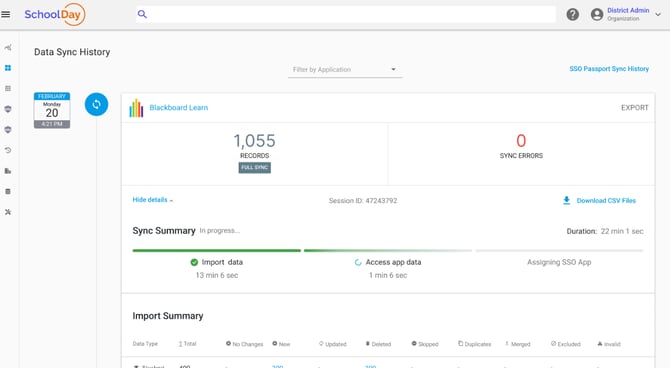
Improved data sync monitoring and reporting
Audience: District Admins
District Admins can now see the full timeline of the data sync process. In addition to import duration, the system shows data processing time and AppStore sync time, so you know when data becomes available.
Updates
Teacher Portal UI enhancements in Privacy Governance Console
Audience: Teachers
Teachers can now manage applications more efficiently using new filters, improved views, and clearer guidance.
- Multi-status filtering: Teachers can view applications across multiple statuses in a single place.
- Filtered default view: The grid now filters out applications without an approval status, resulting in a cleaner and more relevant default display.
- On-screen guidance: Added instructions explaining the purpose of the Teacher Portal and how to complete approvals.
These enhancements help teachers process applications faster, reduce errors, and navigate the portal with greater confidence.
Enhanced Approval Process View in Privacy Governance Console
Audience: District Admins
The approval process interface in the Console has been redesigned with a clearer layout to improve readability. Admins can now review and manage approval steps more easily through a streamlined interface, helping them process approvals faster and with less confusion.
Optimized load speeds for Privacy Governance Console
Audience: District Admins
Load speeds have been optimized for large districts with significant amounts of data. This ensures that the interface remains responsive and pages load quickly, even when managing a high volume of records.
Chrome Extension enhancements
Audience: District Admins
The Chrome Extension has been updated to improve usability and session stability:
- Updated sidebar scrollbars: The sidebar now includes interactable scrollbars, making navigation smoother and easier.
- Session state optimizations: Reduces untimely or unexpected logouts, providing a more stable and reliable user experience.
Data access event management
Audience: Vendor Admins
Vendor Admins can now disable data access events for specific applications and integrations. This reduces system load and associated costs by preventing the generation of unnecessary events. By filtering out these events, you can focus your system logs on the data most relevant to your organization. Available in Application Settings > Delivery Config > Advanced Settings > Disable Data Access Events.