
A data-sharing request is a formal consent record that controls which district data SchoolDay sends to a vendor application. No data is shared with a vendor app until a request is approved by both sides.
How data-sharing requests work
When a district connects an Export (vendor) application, SchoolDay requires a data-sharing request to be created and approved before any roster data is sent. This request defines exactly what data is shared, with which schools, and for how long.
Requests can be initiated from either side:
|
Initiated by |
Scenario |
|---|---|
|
District Admin |
Activating a new vendor app, or requesting changes to an existing one |
|
Vendor |
Requesting access to district data or asking for changes to the current agreement |
Both cases go through the same approval flow. The party that receives the request must approve it before data sharing begins or changes take effect.
Request lifecycle
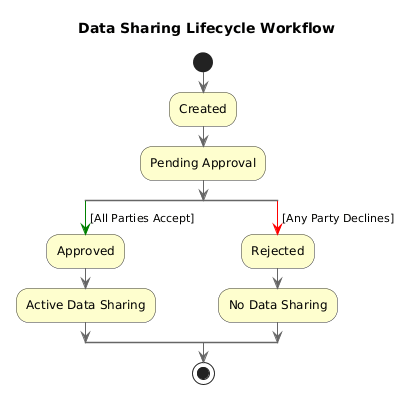
A request moves through the following statuses:
- Pending approval: You sent a request to the vendor; waiting for their approval.
- Awaiting your review: A vendor sent you a request; your action is required.
- Approved: Request was approved; data sharing is active.
- Rejected: Request was rejected by you or the vendor.
All past and current requests are stored in the Consents tab on the application page.
What a request controls
Each data-sharing request defines:
- Schools — which schools' roster data is included
- Attributes — which data fields are shared (e.g., student names, emails, enrollment)
- Privacy Shield — whether PII masking is applied before data is sent
- Filters — rules that limit which records are shared
- Expiration time — the date when data access automatically ends
- Attachments — supporting documents such as contracts or privacy policies
For a full description of each setting, see Data-sharing request settings.
Expiration and access control
Every vendor app has an expiration date set in the data-sharing request. When the expiration date passes:
- Data sharing pauses automatically.
- The app status changes to Expired.
- A District Admin must extend the expiration to resume sharing.
If expiration is approaching but has not yet passed, the app shows Suspended status as an early warning.
Recommendation: Set the expiration date to match the length of your vendor contract or 1–2 school years to avoid unexpected interruptions.
Requirements
- Primary District Admin permissions are required to create, send, approve, or reject data-sharing requests.