
A Privacy Shield level describes how much PII a vendor application masks. SchoolDay assigns the level automatically — you do not choose it directly. The level is calculated from two inputs: which attributes your district marks as sensitive, and which attributes the vendor supports masking. To raise your level, mark additional attributes as sensitive in Data Quality > Privacy Shield.
You can view the current level assigned to an application on its Overview page in SchoolDay.
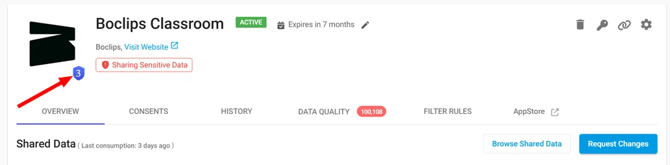
Level definitions
|
Level |
Attributes masked |
|---|---|
|
Level 3 — Full PII (OneRoster and Basic Roster PII) |
Last Name, First Name, Middle Name, Username, Email, Phone numbers, Birth Date |
|
Level 2 — Core PII |
Last Name, First Name, Email |
|
Level 1 — Minimal PII |
Last Name only |
|
No Privacy Shield |
No PII masked, or the application does not meet any level's requirements |
Note: The attributes available for masking may differ if any have been removed from Attributes Mapping for that application.
How levels are assigned
SchoolDay compares the attributes your district masks against what the vendor allows, then assigns the highest level both sides satisfy.
Example: Your app supports Level 3 but is showing Level 2. That means Email is not currently being masked. Go to Data Quality > Privacy Shield and mark Email as sensitive to reach Level 3.
Caution: Removing a sensitive attribute from your configuration automatically lowers the application's Privacy Shield level.
Level assignment by attribute
The table below shows which attributes must be masked to reach each level.
|
Attribute |
Level 1 |
Level 2 |
Level 3 |
|---|---|---|---|
|
Last Name |
+ |
+ |
+ |
|
First Name |
+ |
+ |
|
|
|
+ |
+ |
|
|
Middle Name |
+ |
||
|
Username |
+ |
||
|
Phone numbers |
+ |
||
|
Birth Date |
+ |
What "No Privacy Shield" means
An application is assigned No Privacy Shield when one of the following is true:
- The vendor has not enabled masking for any PII attribute.
- All sensitive attributes in your district's configuration are marked as required by the vendor, so none can be masked or excluded.
- No attributes are marked as sensitive in your district configuration. If you just activated Privacy Shield and see this level, this is the most likely cause. Go to Data Quality > Privacy Shield to mark attributes as sensitive.
No Privacy Shield does not mean the application is blocked from syncing. It means no masking is applied and the vendor receives data as-is.
Related articles
- Privacy Shield overview
- Mark sensitive data attributes
- Apply Privacy Shield to a data sync