
SSO works in the SchoolDay Portal by default, but you can extend SSO to your Learning Management System, app login pages, and direct-access links.
Embed SSO links in your LMS
Generate SchoolDay Instant Login Links and embed them in your LMS. Users click the link to launch an SSO app without visiting the SchoolDay Portal first.
Contact SchoolDay Customer Support for the Instant Login Link setup steps specific to your LMS.
Enable Login with SchoolDay on app websites
Some applications allow users to authenticate using a Login with SchoolDay button directly on the app's login page.
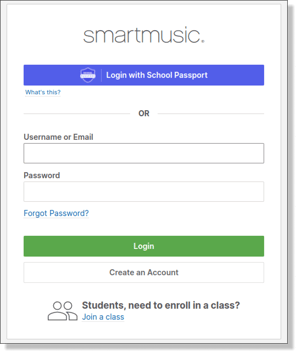
If an app supports this option, users can:
- Go to the app's website.
- Click Login with SchoolDay (or similar).
- Authenticate using their SchoolDay credentials.
- Be logged in to the app automatically.
Check whether your app supports this option on its login page.
Generate SSO links for direct access
SchoolDay lets you create single-click access URLs that launch apps without requiring users to visit the Portal. Share these links via email, bookmarks, or internal documentation.
For instructions on generating and managing SSO links, see Generate SSO links for direct access.
Next steps
- Add an SSO application
- Generate SSO links for direct access
- Test an SSO application