
In this article
You can customize which email notifications you personally receive from SchoolDay, separately from your organization's default notification settings.
Requirements
- An active SchoolDay account.
- District Admin, Primary District Admin, and Vendor Admin roles.
Procedure
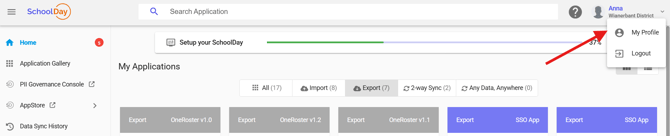
- In the header toolbar, click your profile name and select My Profile.
- Go to Email Notifications.
- Choose the events you want to receive email notifications for.
- Click Save.
Verify the configuration
- Reopen My Profile > Email Notifications and confirm your selections were saved.
How personal and organization settings interact
If your personal notification settings conflict with your organization's default settings, your personal settings take priority.