
In this article
Who receives these notifications
Subscribe your organization's District Admins to email notifications for events like data-sharing requests and app activations. You can't edit the content of these emails — only which events trigger them.
Requirements
-
Primary District Admin permissions.
Who receives these notifications
All District Admins newly created in your organization automatically receive default email notifications. You can't change this recipient list.
Notification events
|
Event |
What it notifies you about |
|---|---|
|
Data Access Request |
Approvals, rejections, or new data access requests in your district |
|
On-Demand/Special Offer Activation |
When an app connection process starts (typically ~24 hours for vendors to prepare) or completes |
|
Privacy Policy |
When a vendor updates their privacy policy document |
|
Safety Threshold |
When the system detects data changes during sync that exceed your configured limits, requiring approval or rejection |
|
Institution Validation |
Data access expiration, connectivity issues, and daily summaries |
Procedure
- Go to Connect.
- Go to Administration > Default Email Notifications.
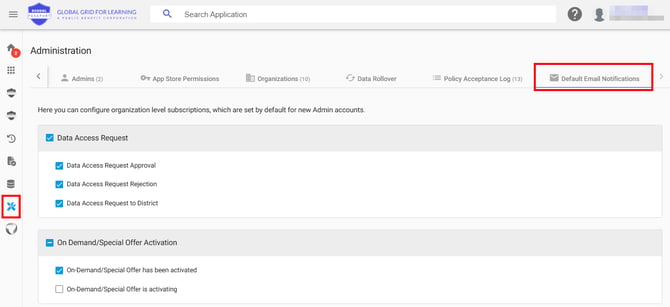
- Choose the events you want your organization to receive notifications for.
- Click Save.
How this interacts with personal settings
Individual admins can also set personal notification preferences in My Profile > Email Notifications. If personal and organization settings conflict, personal settings take priority. See Manage your personal notification preferences.
Verify the configuration
- Reopen Administration > Default Email Notifications and confirm your selected events are checked.
- Trigger a test event (for example, a data access request) and confirm District Admins receive the email.