
In this article
Assign administrator roles to users to let them perform management tasks, such as running syncs and resolving data issues. Users can hold multiple roles simultaneously. For example, a teacher can also be a District Admin.
For a full breakdown of role capabilities, see Roles and Permissions.
Requirements
- District Admin, Primary District Admin, and Vendor Admin roles.
Assign an admin role
- Sign in to SchoolDay.
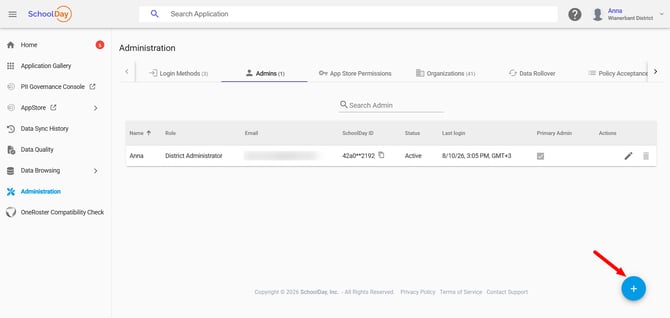
- District Admin: Go to Connect > Administration > Admins.
- Vendor Admin: Go to Administration > Admins.
- Click the plus icon on the bottom right to add a new admin.
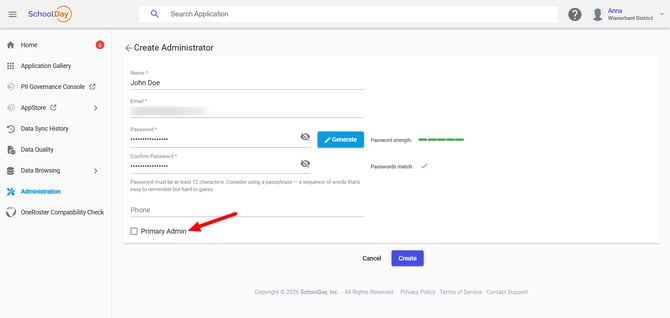
- Enter the name, email, and password.
- Tip: To automatically generate a strong password, select Generate.
- (Optional, Primary District Admin only) Select the Primary Admin checkbox to grant primary permissions.
- Click Create.
The new admin receives an email containing a password setup link. The link expires within 24 hours.
Assign Primary permissions to an existing admin
Only Primary District Admins can perform this procedure.
- Go to Administration > Admins.
- Select the target admin user.
- Select the Primary Admin checkbox.
- Click Save.
To verify whether an admin has primary permissions, view their details in Administration > Admins.
Remove an admin role
- Go to Administration > Admins.
- Next to the admin you want to remove, select Delete.
Removing an admin role reverts the user to non-admin status if they were imported from roster data. The user retains access to SchoolDay but loses management controls. You cannot remove your own admin role.
Verify the configuration
- Go to Administration > Admins and confirm that the new admin or updated status appears correctly.
- Verify that the new admin can sign in using the password setup link and access the expected management controls.
Troubleshooting
|
Symptom |
Cause |
Fix |
|---|---|---|
|
New admin's setup link doesn't work |
Link expired (24-hour limit) |
Delete and recreate the admin, or ask a Primary District Admin to resend |
|
Can't select Primary Admin checkbox |
You don't have Primary District Admin permissions |
Ask your district's Primary District Admin to assign the role |