---
title: How to access Coursera Course from Buzz LMS
description: In this article, you can find a detailed description of the proper way of accessing Coursera from Buzz LMS using SchoolDay as a middleware provider for the integration
---
[Skip to content](https://help.schoolday.com/knowledge/accessing-coursera-course-from-buzz-lms#main-content)
English
Show submenu for translations
[More support](https://help.schoolday.com/knowledge/kb-tickets/new?hsLang=en) [Customer portal](https://help.schoolday.com/support?hsLang=en)

- [Go to Knowledge Base](https://help.schoolday.com/knowledge)
Open main navigation
Close main navigation
- [Go to Knowledge Base](https://help.schoolday.com/knowledge)
- English
Show submenu for translations
- [More support](https://help.schoolday.com/knowledge/kb-tickets/new)
- [Customer portal](https://help.schoolday.com/support)
What are you looking for?
- There are no suggestions because the search field is empty.
1. [SchoolDay Help Center](https://help.schoolday.com/knowledge?hsLang=en)
2. [LMS Integrations](https://help.schoolday.com/knowledge/lms-integrations?hsLang=en)
3. [Coursera Integration Video Guides](https://help.schoolday.com/knowledge/lms-integrations?hsLang=en#coursera-integration-video-guides)
August 18, 2025
# How to access Coursera Course from Buzz LMS
## In this article, you can find a detailed description of the proper way of accessing Coursera from Buzz LMS using SchoolDay as a middleware provider for the integration
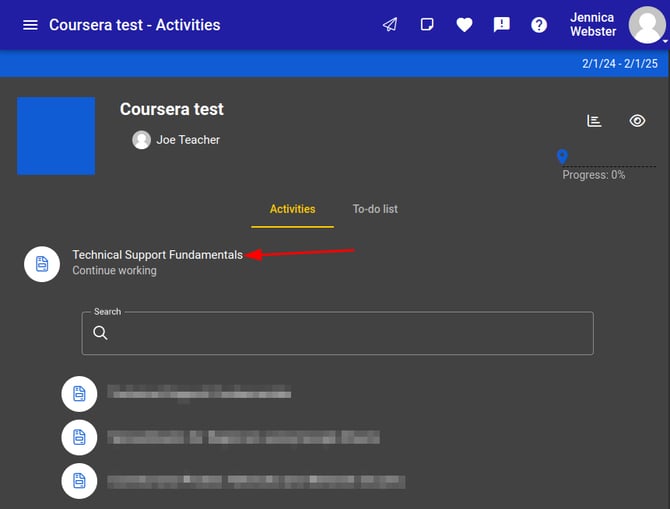
To access the Coursera course an LMS learner/instructor the user would navigate to a Buzz course and click on the deeplink that is associated with the corresponding Coursera course.
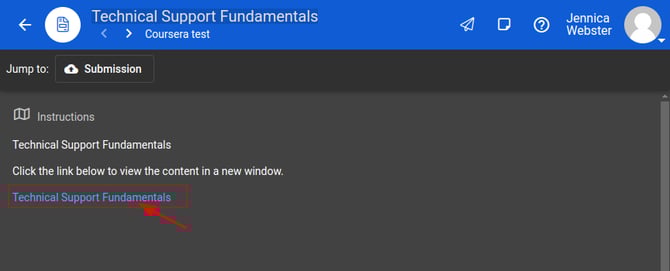
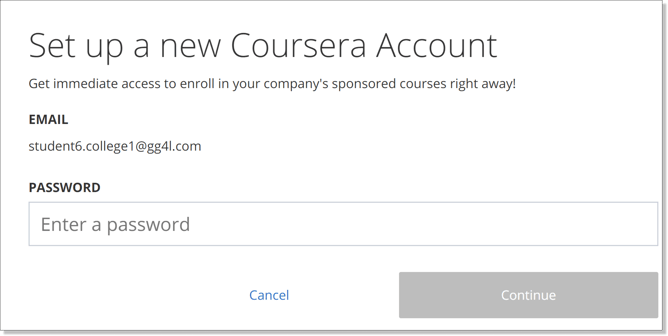
Once the user is redirected to Coursera for the first time, the user is prompted to complete enrollment:
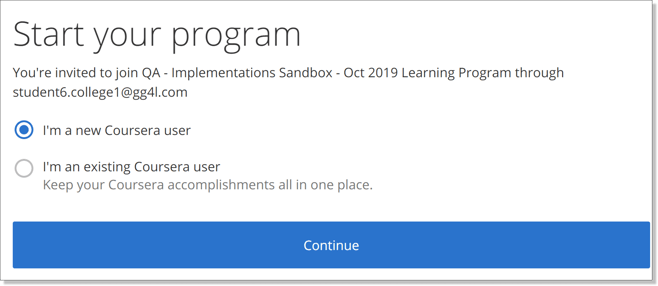
***Please note:***
\- If an account for the user’s email address already exists on the Coursera platform, the user should type in the password during the first login.
\- If there is no account for the email created yet, the user creates it during the first SSO attempt and sets up the password.
The next time the user enters the Coursera course (completes SSO) via the published link in LMS, the user gets redirected to Coursera course content automatically.
1. **The user already has a Coursera account**: the system will ask the user to provide an email address and a password for the existing account: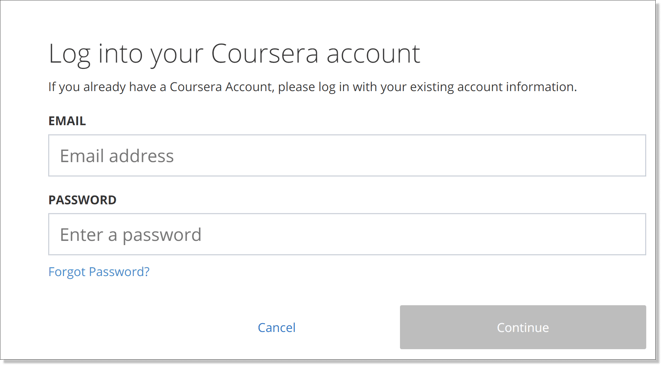
2. **The user is new to Coursera:** the system will prompt the user to create a password:
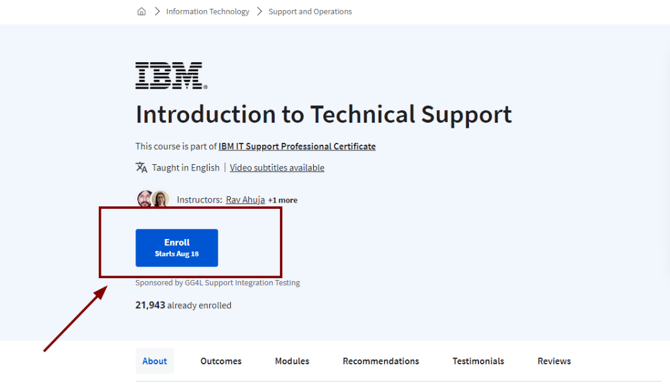
Once the user establishes an association with the Coursera program, they will be navigated to a respective Coursera course page and need to click **"Enroll"**:
### 
To keep the connection between your LMS and Coursera accounts intact, **make sure the email address in your LMS matches the one used on Coursera.**
If you update your email address in the LMS after the initial setup, please **also update your email on Coursera accordingly**. You can follow the steps in [this guide](https://www.coursera.support/s/article/learner-000001383?language=en_US#change_email) to change your Coursera email if needed.
- [Getting Started](https://help.schoolday.com/knowledge/getting-started?hsLang=en#main-content)
- [Introduction](https://help.schoolday.com/knowledge/getting-started?hsLang=en#introduction)
- [Getting Started by Role](https://help.schoolday.com/knowledge/getting-started?hsLang=en#getting-started-by-role)
- [Get Support](https://help.schoolday.com/knowledge/getting-started?hsLang=en#get-support)
- [Legal](https://help.schoolday.com/knowledge/getting-started?hsLang=en#legal)
- [Data Management (Connect)](https://help.schoolday.com/knowledge/data-management-connect?hsLang=en#main-content)
- [Introduction](https://help.schoolday.com/knowledge/data-management-connect?hsLang=en#introduction)
- [Applications](https://help.schoolday.com/knowledge/data-management-connect?hsLang=en#applications)
- [Data Mapping](https://help.schoolday.com/knowledge/data-management-connect?hsLang=en#data-mapping)
- [Data Synchronization](https://help.schoolday.com/knowledge/data-management-connect?hsLang=en#data-synchronization)
- [Data-Sharing Requests](https://help.schoolday.com/knowledge/data-management-connect?hsLang=en#data-sharing-requests)
- [Data Quality](https://help.schoolday.com/knowledge/data-management-connect?hsLang=en#data-quality)
- [Data Privacy (Privacy Shield)](https://help.schoolday.com/knowledge/data-management-connect?hsLang=en#data-privacy-privacy-shield)
- [Grade Sync Service](https://help.schoolday.com/knowledge/data-management-connect?hsLang=en#grade-sync-service)
- [Miscellaneous](https://help.schoolday.com/knowledge/data-management-connect?hsLang=en#miscellaneous)
- [Roster Integrations](https://help.schoolday.com/knowledge/roster-integrations?hsLang=en#main-content)
- [Introduction](https://help.schoolday.com/knowledge/roster-integrations?hsLang=en#introduction)
- [SFTP](https://help.schoolday.com/knowledge/roster-integrations?hsLang=en#sftp)
- [PowerSchool Integration](https://help.schoolday.com/knowledge/roster-integrations?hsLang=en#powerschool-integration)
- [Import Integrations](https://help.schoolday.com/knowledge/roster-integrations?hsLang=en#import-integrations)
- [Export Integrations](https://help.schoolday.com/knowledge/roster-integrations?hsLang=en#export-integrations)
- [Administration & Account Settings](https://help.schoolday.com/knowledge/administration-account-settings?hsLang=en#main-content)
- [Account Settings](https://help.schoolday.com/knowledge/administration-account-settings?hsLang=en#account-settings)
- [Organization Management](https://help.schoolday.com/knowledge/administration-account-settings?hsLang=en#organization-management)
- [SSO](https://help.schoolday.com/knowledge/sso?hsLang=en#main-content)
- [Introduction](https://help.schoolday.com/knowledge/sso?hsLang=en#introduction)
- [Identity provider (IdP) Setup](https://help.schoolday.com/knowledge/sso?hsLang=en#identity-provider-idp-setup)
- [SSO Applications](https://help.schoolday.com/knowledge/sso?hsLang=en#sso-applications)
- [MFA for Administrators](https://help.schoolday.com/knowledge/sso?hsLang=en#mfa-for-administrators)
- [MFA for Users (SchoolDay Login)](https://help.schoolday.com/knowledge/sso?hsLang=en#mfa-for-users-schoolday-login)
- [ID Card Login](https://help.schoolday.com/knowledge/sso?hsLang=en#id-card-login)
- [SSO Troubleshooting](https://help.schoolday.com/knowledge/sso?hsLang=en#sso-troubleshooting)
- [LMS Integrations](https://help.schoolday.com/knowledge/lms-integrations?hsLang=en#main-content)
- [Coursera Integration Video Guides](https://help.schoolday.com/knowledge/lms-integrations?hsLang=en#coursera-integration-video-guides)
- [Coursera Platform Integration](https://help.schoolday.com/knowledge/lms-integrations?hsLang=en#coursera-platform-integration)
- [Qwiklabs Platform Integration](https://help.schoolday.com/knowledge/lms-integrations?hsLang=en#qwiklabs-platform-integration)
- [LMS Integrations instructions](https://help.schoolday.com/knowledge/lms-integrations?hsLang=en#lms-integrations-instructions)
- [Resource Management (App Store)](https://help.schoolday.com/knowledge/resource-management-app-store?hsLang=en#main-content)
- [Users & Classes](https://help.schoolday.com/knowledge/resource-management-app-store?hsLang=en#users-classes)
- [Resources](https://help.schoolday.com/knowledge/resource-management-app-store?hsLang=en#resources)
- [Access & Security](https://help.schoolday.com/knowledge/resource-management-app-store?hsLang=en#access-security)
- [Privacy Governance Console (PGC)](https://help.schoolday.com/knowledge/privacy-governance-console-pgc?hsLang=en#main-content)
- [Get Started](https://help.schoolday.com/knowledge/privacy-governance-console-pgc?hsLang=en#get-started)
- [Monitor and Report](https://help.schoolday.com/knowledge/privacy-governance-console-pgc?hsLang=en#monitor-and-report)
- [Govern Apps](https://help.schoolday.com/knowledge/privacy-governance-console-pgc?hsLang=en#govern-apps)
- [For Parents/Students](https://help.schoolday.com/knowledge/for-parents-students?hsLang=en)
- [For Vendors](https://help.schoolday.com/knowledge/for-vendors?hsLang=en)
- [Updates](https://help.schoolday.com/knowledge/updates?hsLang=en#main-content)
- [2026](https://help.schoolday.com/knowledge/updates?hsLang=en#2026)
- [2025](https://help.schoolday.com/knowledge/updates?hsLang=en#2025)
- [2024](https://help.schoolday.com/knowledge/updates?hsLang=en#2024)
- [2023](https://help.schoolday.com/knowledge/updates?hsLang=en#2023)
- [2022](https://help.schoolday.com/knowledge/updates?hsLang=en#2022)
- [Reference](https://help.schoolday.com/knowledge/reference?hsLang=en#main-content)
- [APIs](https://help.schoolday.com/knowledge/reference?hsLang=en#apis)
- [CSV File Formats](https://help.schoolday.com/knowledge/reference?hsLang=en#csv-file-formats)
[%20(1).png?width=300&height=100&name=schoolday-logo%20(300%20x%20100%20px)%20(1).png "SchoolDay logo")](http://schoolday.com)
[mailto:support@schoolday.com](mailto:support@schoolday.com)
Copyright © 2025, SchoolDay, Inc.
```json
{
"@context" : "https://schema.org",
"@type" : "VideoObject",
"contentUrl" : "https://5314445.fs1.hubspotusercontent-na1.net/hubfs/5314445/Agilix%20Buzz%20LMS%20(SSO).mp4",
"dateModified" : "2024-05-22T08:30:00.080Z",
"duration" : "PT1M43S",
"height" : 1080,
"name" : "Agilix Buzz LMS (SSO)",
"thumbnailUrl" : "https://5314445.fs1.hubspotusercontent-na1.net/hubfs/5314445/Agilix%20Buzz%20LMS%20(SSO).mp4/medium.jpg",
"uploadDate" : "2024-05-22T08:30:00.075Z",
"width" : 1920
}
```